The traditional perception of Microsoft PowerPoint as a mere repository for bullet points and static images is undergoing a fundamental transformation as Instructional Designers, educators, and Learning and Development (L&D) professionals adopt sophisticated strategies to drive engagement and knowledge retention. In an era where digital fatigue is a constant challenge, the strategic application of advanced PowerPoint features has become a critical competency for corporate trainers and business leaders alike. This evolution represents a shift from basic slide editing to a comprehensive design-thinking approach, where every transition, visual element, and layout choice is engineered to support specific cognitive outcomes and organizational goals.
The Paradigm Shift: From Presentation Tool to Strategic Communication System
For decades, the term "Death by PowerPoint" characterized the corporate world’s struggle with over-saturated, text-heavy slides that obscured rather than clarified information. However, the modern professional landscape—defined by remote work, asynchronous learning, and high-speed information consumption—has necessitated a more rigorous application of the software. Professionals in the L&D sector are now utilizing PowerPoint as a modular authoring tool, capable of producing high-fidelity training materials that rival dedicated eLearning software.
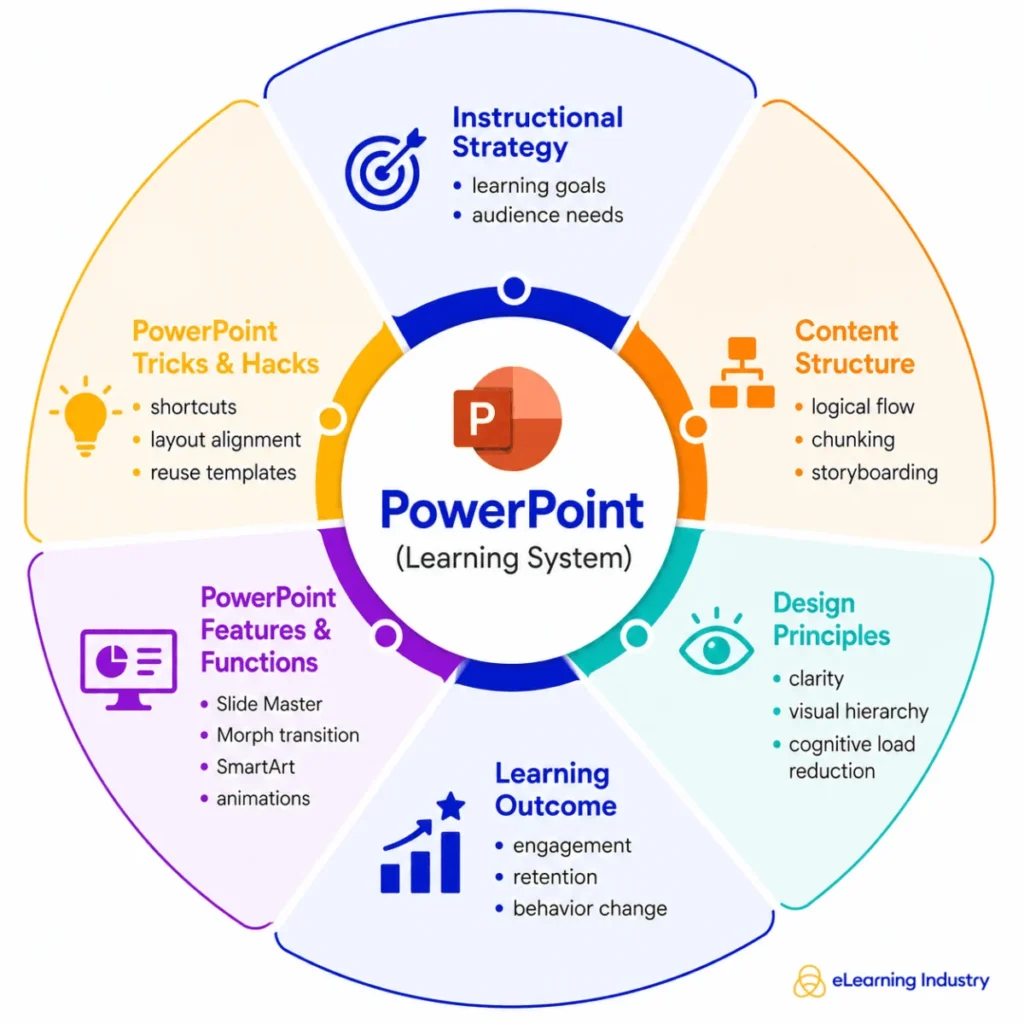
The core of this transition lies in "Strategic Use," a methodology that prioritizes information architecture over decoration. By leveraging advanced design principles, Instructional Designers can guide an audience’s attention through complex data sets, ensuring that the most critical insights are processed first. This approach is categorized into four primary domains: Efficiency (the speed of content creation), Design (the visual clarity and branding), Delivery (the performance and pacing of the presenter), and Learning Design (the cognitive alignment of content with the audience’s ability to retain information).
A Chronology of Presentation Evolution: The Path to Modern Sophistication
The journey of PowerPoint from a basic transparency replacement to an AI-powered design suite provides essential context for today’s expert-level tricks.
- The Formative Era (1987–1995): Initially developed as "Presenter" for the Apple Macintosh, PowerPoint was acquired by Microsoft and integrated into the Office suite. During this period, the focus was on replacing physical overhead projectors.
- The Bullet-Point Dominance (1996–2010): As the software became ubiquitous in boardrooms, the "bullet point" became the standard. This era was marked by high cognitive load and the emergence of the "Death by PowerPoint" phenomenon.
- The Visual Revolution (2011–2019): With the introduction of SmartArt, the Slide Master, and cloud-based collaboration, the focus shifted toward visual storytelling. Professionals began to recognize that audiences process visual information 60,000 times faster than text.
- The Strategic and AI Era (2020–Present): The integration of the Morph transition, AI-powered Designer suggestions, and the Presenter Coach has turned PowerPoint into a sophisticated pedagogical tool. The global shift to virtual training during the COVID-19 pandemic accelerated the need for presentations that could maintain engagement through a computer screen.
Technical Deep Dive: Features Powering High-Impact Learning
The distinction between a standard user and an expert lies in the mastery of features that automate consistency and enhance visual flow.
The Power of the Morph Transition
The Morph transition is frequently cited by Instructional Designers as a "game-changer" for instructional flow. Unlike standard fades or wipes, Morph recognizes the same object across two consecutive slides and animates its movement, size, or color change seamlessly. This allows trainers to "zoom in" on specific parts of a complex diagram or "move" through a timeline, creating a cinematic experience that maintains the learner’s spatial orientation within the information.
Slide Master and Scalability
For L&D departments managing hundreds of training modules, the Slide Master is the backbone of efficiency. It allows for global changes—such as updating a corporate logo, changing a primary font, or adjusting a footer—to be applied across hundreds of slides simultaneously. This ensures that every presentation remains "on-brand" and professional, reducing the manual labor associated with content updates.
SmartArt and Visual Frameworks
Rather than listing steps in a process as a numbered list, experts use SmartArt to convert text into cyclical, hierarchical, or relationship-based diagrams. This aligns with the "Dual Coding Theory," which suggests that providing both verbal and visual representations of information leads to better encoding in long-term memory.
Presenter Coach and AI-Driven Preparation
The modern presenter has access to an AI-driven "Presenter Coach" that analyzes rehearsals in real-time. This tool provides data on pacing, detects the use of filler words like "um" or "uh," and flags non-inclusive language. For business leaders, this represents a significant shift in how high-stakes presentations are prepared, moving from subjective self-assessment to objective, data-backed feedback.

The Cognitive Science of Slide Design: Reducing Load and Increasing Retention
Effective PowerPoint usage is increasingly grounded in educational psychology, specifically the reduction of "Cognitive Load." When a slide is cluttered, the learner’s working memory is taxed by trying to filter out irrelevant information, leaving less mental energy for actual learning.
The "One Idea Per Slide" Mandate
A cornerstone of modern instructional design is the "one idea per slide" rule. By isolating concepts, the presenter prevents "split-attention effect," where the audience is forced to choose between reading a complex slide and listening to the speaker. Professionals now use "Story-Driven Sequencing," where each slide acts as a single frame in a narrative, building momentum toward a specific insight or call to action.
Visual Hierarchy and Contrast
Designers use size, color, and placement to create a "pathway" for the eye. A large, bold heading combined with ample white space ensures that the most important information is seen first. Research indicates that high-contrast slides (e.g., dark text on a light background or vice versa) significantly reduce eye strain and improve accessibility for learners with visual impairments.
Industry Implications: PowerPoint as a Sales and Strategy Driver
The impact of these techniques extends far beyond the classroom. In the corporate sector, PowerPoint remains the primary vehicle for sales enablement and executive strategy.
Sales Enablement
Sales teams are moving away from generic pitch decks in favor of modular, interactive PowerPoint presentations. By using internal hyperlinks and "Zoom" features (which allow a presenter to jump to specific sections of a deck based on client feedback), sales professionals can conduct non-linear, prospect-driven conversations. This adaptability increases the perceived value of the interaction and improves conversion rates.
Employee Onboarding
Modern onboarding journeys are increasingly delivered through "microlearning" frameworks built in PowerPoint. These short, visually-rich decks are designed to be consumed on mobile devices or during brief intervals in the workday. By breaking down company culture and technical processes into digestible "cool" presentations, organizations report higher levels of new-hire engagement and faster time-to-productivity.
Professional Best Practices: An Essential Checklist
To achieve the level of polish seen in professional L&D materials, experts adhere to a rigorous quality control checklist:
- Consistency: Use a unified color palette and font family (no more than two fonts per deck).
- Alignment: Utilize the "Align and Distribute" tools to ensure all elements are mathematically centered and spaced.
- Media Optimization: Compress all images and videos to ensure the file remains responsive during live delivery or online streaming.
- Accessibility: Ensure all images have Alt Text and that the "Reading Order" is logical for screen readers.
- Narrative Flow: Structure the presentation using the "Problem-Insight-Resolution" framework to maintain engagement.
Analysis of the Future: AI and the Automation of Design
The trajectory of PowerPoint is currently being shaped by Generative AI. With the integration of Microsoft Copilot, the "trick" of the future may not be how to design a slide, but how to prompt the AI to generate a narrative structure from a raw document. However, industry experts argue that while AI can handle the "decoration," the "instructional strategy"—the human understanding of what an audience needs to know and how they feel—will remain the domain of the professional.
The broader implication is a democratization of high-end design. As tools like "Designer" suggest layouts that follow the rules of the Golden Ratio and color theory, the baseline for "professional" presentations is rising. To stand out, L&D professionals and business leaders must focus on the nuances of storytelling and the psychological triggers that turn a passive viewer into an active learner.
Conclusion
PowerPoint has transcended its origins as a digital slideshow to become a sophisticated system for strategic communication. For those in the fields of education and corporate training, mastering these "tricks" is no longer optional—it is a foundational requirement for effective knowledge transfer. By combining the technical capabilities of the software with the principles of cognitive science, professionals can create experiences that not only inform but also inspire and transform their audiences. As the digital landscape continues to evolve, the ability to distill complex ideas into clear, engaging, and memorable visual stories will remain one of the most valuable skills in the modern economy.