The Landscape of Modern Corporate Video Learning
The rise of video as a training tool is supported by significant industry data. According to recent workforce trends, visual information is processed significantly faster by the human brain than text, and employees are reportedly 75% more likely to watch a video than read documents, emails, or web articles. For HR and L&D leaders, the objective is no longer merely to "have" video content, but to integrate it into a broader strategy that addresses specific skill gaps.
Effective training videos are distinguished by their intentionality. Unlike promotional media or recorded meetings, instructional videos are built around a specific learning objective. They are designed to show, rather than just tell, how a process, behavior, or decision-making framework should be executed in a professional context. This shift toward "performance-first" design ensures that video assets serve as tools for active improvement rather than passive consumption.
A Chronological Workflow for Effective Video Production
Creating impactful training content requires a structured approach that prioritizes the learner’s needs over aesthetic flourishes. Industry experts suggest an eight-step lifecycle for the development of instructional video assets.
1. Performance Needs Analysis
The process begins with a critical assessment of the workplace problem. Before a single frame is shot, L&D teams must determine if a lack of knowledge is the actual root cause of a performance issue. If a process is broken or tools are inadequate, video training will not provide a solution. This stage involves interviewing stakeholders to identify exactly what employees need to change in their daily routines.
2. Defining Audience and Objectives
A common pitfall in corporate training is the creation of "one-size-fits-all" content. A professional workflow requires defining the audience’s existing knowledge, their technical environment, and their language requirements. Learning objectives must be observable and measurable. For example, moving from a vague goal like "understand the software" to a concrete objective such as "successfully process a customer refund in under three minutes" provides a clear benchmark for success.
3. Selection of Format and Production Model
The complexity of the task dictates the format. Organizations must choose between several production models:
- In-House Production: Utilizing internal teams for rapid, cost-effective content creation.
- User-Generated Content (UGC): Empowering subject matter experts (SMEs) to record their own demonstrations, fostering a culture of peer-to-peer learning.
- Professional Outsourcing: Engaging external agencies for high-stakes, high-polish content such as leadership development or external brand training.
4. Scripting for Instruction
A script for a training video differs from a standard speech. It must be written for the ear, using active voice and concise language. A standard instructional structure includes an explanation of why the task matters, a step-by-step demonstration, highlights of common errors to avoid, and a prompt for the learner to take immediate action or practice the skill.
5. Visual Storyboarding
Storyboarding serves as the blueprint for the video. This step allows creators to plan camera angles, on-screen text, and graphics without the expense of a full production. For screencasts, this involves identifying which parts of the user interface need to be highlighted to prevent cognitive overload.
6. Technical Execution: Audio and Visuals
While high-definition visuals are a standard expectation, audio quality is often the most critical technical factor. Studies in instructional design suggest that learners will tolerate lower-quality video, but poor audio quality leads to immediate disengagement and lower retention rates. Professional environments require controlled acoustics and high-quality microphones to ensure clarity.

7. Editing for Clarity and Accessibility
The editing phase is where distractions are removed. This includes cutting filler words, long pauses, and non-essential information. Crucially, this stage must address accessibility. This includes adding accurate closed captions, providing transcripts, and ensuring that the color contrast of on-screen text meets international accessibility standards (such as WCAG).
8. Deployment and Iteration
The final step is the pilot phase. Testing the video with a small group of representative learners can reveal if the instructions are clear or if certain segments are confusing. Once published via a Learning Management System (LMS) or a Video Content Management System (VCMS), the data—such as drop-off rates and assessment scores—should drive future updates.
Categorizing Training Video Types
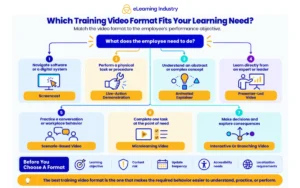
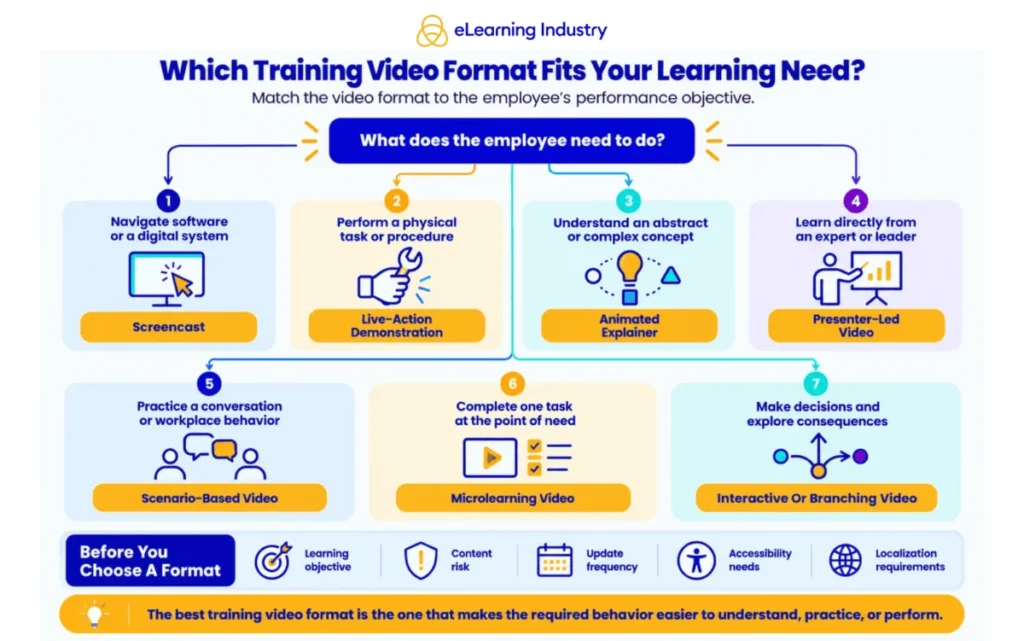
Not all training videos serve the same purpose. Organizations typically deploy a mix of the following seven formats to meet various organizational needs:
- Screencasts: Best for software training and digital workflows. They provide a direct view of the user interface.
- Live-Action Demonstrations: Essential for physical tasks, safety procedures, and manufacturing processes where posture and tool handling are critical.
- Presenter-Led Videos: Used when a human connection or expert authority is needed to build trust or provide context on complex topics.
- Scenario-Based/Role-Play: Ideal for "soft skills" like leadership, conflict resolution, and sales, where learners need to see the consequences of different choices.
- Animated Explainers: Effective for abstract concepts, cybersecurity protocols, or business theories that are difficult to film in reality.
- Microlearning: Focused, short-burst videos (usually under 3 minutes) that answer a single question or provide a quick refresher.
- Interactive/Branching Videos: High-engagement tools that allow learners to make decisions and see different outcomes, effectively turning the video into a simulation.
Technical Infrastructure and Software Selection
The choice of technology depends heavily on the internal capabilities of the L&D team. Software tools generally fall into three categories:
- Screen Recording and Simple Editing: Tools like Camtasia or Snagit are industry standards for software walkthroughs due to their built-in cursor effects and annotation tools.
- AI-Driven Video Generation: Platforms such as Synthesia or HeyGen are increasingly used to create presenter-led content using avatars, which significantly reduces the cost of updates and localization.
- Advanced Creative Suites: For high-end production, Adobe Premiere Pro and After Effects remain the preferred choices for professional editors.
On the delivery side, an enterprise video platform must offer robust searchability, security permissions, and detailed analytics. The ability to track "heat maps" of where viewers pause or rewatch sections provides invaluable feedback to instructional designers.
The Critical Role of Accessibility and Global Reach
In a globalized economy, training videos must be designed for a diverse workforce. Localization involves more than just translating captions; it requires a cultural "transcreation" of examples and sometimes the re-recording of audio to ensure the tone is appropriate for different regions.
Accessibility is no longer optional. Beyond legal compliance, inclusive design ensures that employees with visual or hearing impairments have equal access to career development. This includes the use of audio descriptions for visual-heavy content and ensuring that video players are keyboard-navigable.
Broader Impact and Industry Implications
The move toward sophisticated training videos reflects a broader trend in corporate education: the shift from "just-in-case" learning to "just-in-time" support. When videos are integrated into a searchable knowledge base, they become performance support tools that employees can access at the exact moment of need.
Industry analysts suggest that the next frontier for training videos is the integration of Artificial Intelligence and Augmented Reality. AI is already streamlining the transcription and translation process, while AR allows video instructions to be overlaid onto physical equipment in real-time. However, despite these technological leaps, the fundamental principle remains: the effectiveness of a training video is measured by the learner’s ability to perform their job more effectively.
In conclusion, the successful implementation of training videos requires a balance of instructional science and media production. By focusing on clear objectives, prioritizing audio quality, and ensuring accessibility, organizations can create a library of assets that not only inform but transform the workforce. As technology continues to evolve, the most successful companies will be those that view video not as a standalone solution, but as a dynamic component of a comprehensive learning ecosystem.